Skardi
Skardi is an open-source self-improving context framework.
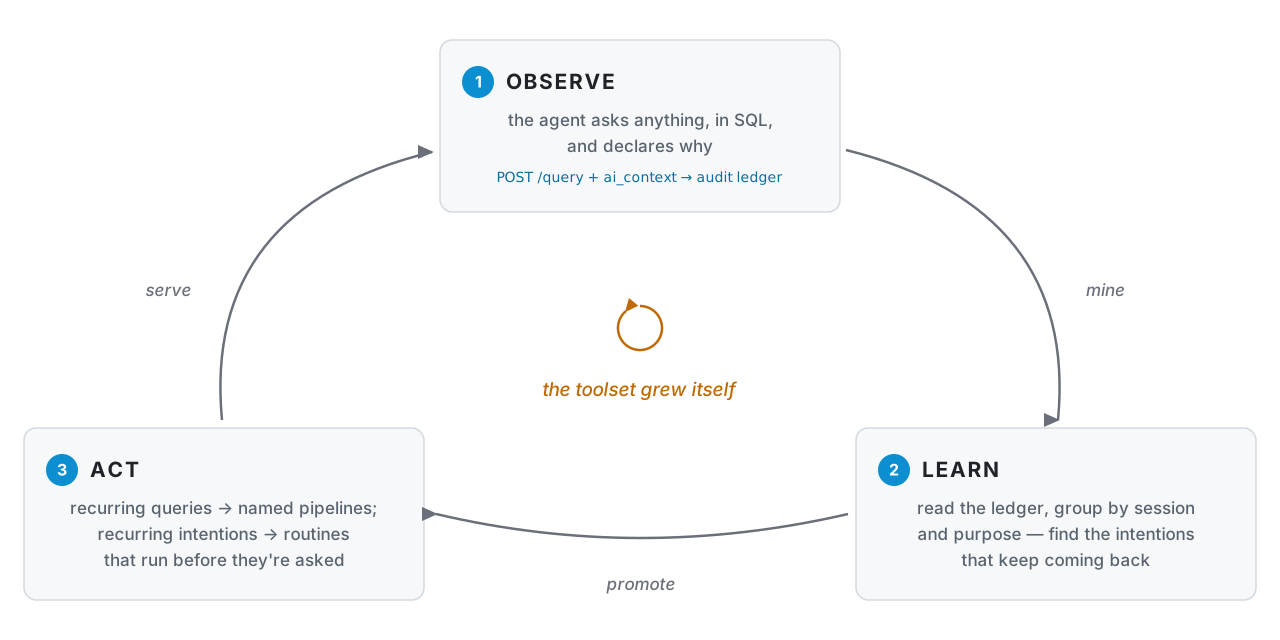
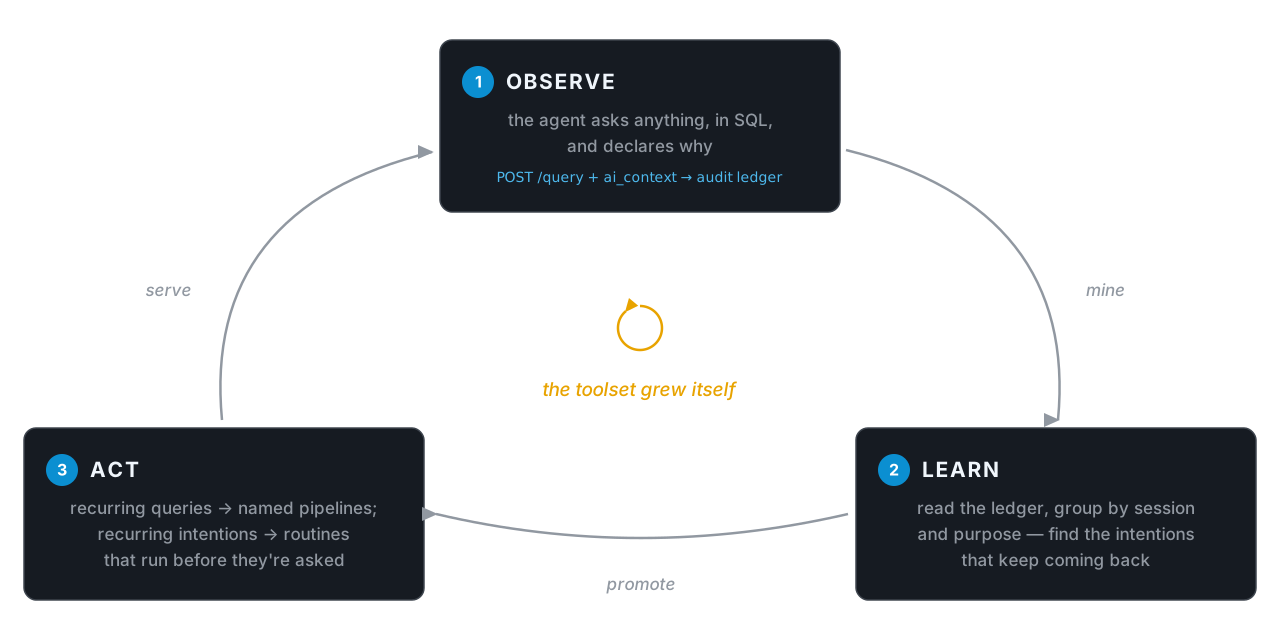
Let your agent query any of your data, declaring why it asks. Skardi records every ask, so the intentions that keep coming back can become named tools and standing routines.
Observe · every query, with intent · Learn · what recurs across sessions · Act · new tools and routines — automation in flight
The loop
Most agent stacks freeze their data tools at ship time: you guess which queries the agent will need, wrap each one by hand, and find out in production what you guessed wrong. Skardi inverts that. The agent gets one general way in, and the tools it ends up with are the ones it demonstrably reached for.
1 — Serve your data, with the ledger on. One ctx.yaml names your sources
(full reference); --query-audit-db turns on the durable
record that makes the rest of the loop possible.
kind: context
metadata: { name: acme }
spec:
  data_sources:
    - name: warehouse            # step 2 queries warehouse.public.subs
      type: postgres
      hierarchy_level: catalog   # register every table in the database
      connection_string: postgres://localhost:5432/acme
# from a source checkout — Docker once --query-audit-db ships in a tagged release
git clone https://github.com/SkardiLabs/skardi.git && cd skardi
cargo run --release --bin skardi-server -- \
  --ctx ctx.yaml --query-audit-db ./audit.db --port 8080
2 — Your agent explores freely, declaring intent. Any SQL over any
registered source, federated in one statement. ai_context is how the agent
says why — purpose and session_id are recorded, never executed.
curl -X POST localhost:8080/query -H 'Content-Type: application/json' -d @- <<'JSON'
{ "sql": "SELECT plan, COUNT(*) AS cancels FROM warehouse.public.subs WHERE cancelled_at > now() - interval '7 days' GROUP BY plan",
  "ai_context": { "purpose": "weekly churn check, by plan", "session_id": "sess-1a2b" } }
JSON
3 — Promote what recurs. in flight — the
skardi-query-log skill
reads the ledger, writes the pipeline, reloads the server, health-checks it, and
rolls back if the install fails. Held until --query-audit-db lands in a tagged
release; today you can read the ledger yourself with plain SQL — it is a SQLite
file indexed on (session_id, created_at).
# /skardi-query-log --db ./audit.db --dir pipelines/ --port 8080 --restart-cmd '...'
#   → 4 sessions asked the same churn question with different windows
#   → wrote pipelines/weekly-churn.yaml, reloaded, /health/weekly-churn ok
kind: pipeline
metadata: { name: weekly-churn, version: "1.0.0" }
spec:
  query: |                                   # the varying window, parameterized
    SELECT plan, COUNT(*) AS cancels FROM warehouse.public.subs
    WHERE cancelled_at > now() - CAST({window} AS INTERVAL)
    GROUP BY plan ORDER BY cancels DESC
4 — The agent has a new tool. One definition, every binding — shell, REST, and MCP over both transports (local stdio and remote streamable HTTP) — so the same promoted pipeline works in Claude Code, Cursor, your own loop, claude.ai, or any HTTP host, with no wrapper code to maintain.
# shell verb — any agent with a Bash tool, no MCP config
skardi run weekly-churn -p window='7 days'
# same pipeline, served as REST
curl -X POST localhost:8080/weekly-churn/execute \
  -H 'Content-Type: application/json' -d '{"window": "7 days"}'
# same pipeline as an MCP tool — hosts that spawn a local process (Claude Desktop, …)
# from a source checkout until `skardi mcp` ships in a tagged release
skardi mcp
# … and as remote MCP — hosts that only take a URL (claude.ai, hosted agents):
# the server above already serves http://localhost:8080/mcp. With auth enabled
# every request carries a Bearer token; a public hostname is declared with
# --mcp-allowed-host api.example.com (loopback is always allowed).
Both MCP bindings — the local skardi mcp bridge and the server's /mcp
endpoint — project the same tool surface; docs/mcp.md covers
host setup, auth, the host allowlist, and reverse proxies for both.
Promoting queries into pipelines is only the simplest form of Act. The same ledger supports
acting on intentions: when every weekday morning ends with the same GitHub +
Slack queries, each declaring purpose: "daily standup", the pattern isn't a
pipeline — it's a routine, and any harness that can run an agent on a schedule
(Claude Code routines, a cron-driven CLI run) can have the standup drafted
before anyone asks. And because the ledger is one SQLite file (or one
Postgres database, via SKARDI_QUERY_AUDIT_PG_DSN — same fail-closed
contract, storage swapped), you can hand a window of it to an LLM and ask
what keeps being needed that nobody turned into a tool — recurring
intentions the user hasn't noticed yet. One boundary is yours
to set: ledger rows carry raw SQL, literals included, so keep that analysis on a
local model or redact first — sending a window to a hosted LLM should be a
deliberate opt-in, not a default. Both land as skills on
top of the ledger, like
skardi-query-log —
no server changes required.
Then back to Observe, with one fewer thing your agent has to figure out from scratch.
Why it compounds
- Intent is recorded, not inferred. The ledger stores why each query ran, not just what ran. Two statements with different SQL and the same purpose are the same question — which is the difference between mining patterns and grepping strings.
- One chokepoint means one memory. Every source sits behind one engine, so a recurring need spanning Postgres, Parquet on S3 and a SaaS API is visible as one pattern. Across N SDKs it is N unrelated log files.
- Promotion is reviewable. What the loop produces is pipeline YAML you read,
diff, edit and revert — not a learned weight you have to trust. Writes stay
governed on the way in too:
access_modegates DML per source, DDL is always rejected, and literals never reach your logs or OTLP stream (why).
Beta. Skardi is under active development and APIs may move. Hit us on Discord if you want to co-design a POC.
Next steps
- Install — the two skills, the CLI, and the server.
- Server — ad-hoc queries,
ai_context, and the audit ledger. - Pipelines — what the loop promotes into.
- Data sources — everything you can register.